

Git is a distributed version control system (DVCS) with which developers track, manage and jointly edit the source code of software projects. Git is an open-source project that Linus Torvalds originally developed in 2005 to manage the Linux kernel source code, and it enables tracking changes, collaboration between multiple developers and creating, managing and merging branches. By a wide margin, Git is today the most-used version control system in software development.
How does Git work?
The central difference from older version control systems lies in the data model: instead of individual change lists (diffs), Git stores a complete snapshot of the project state with every commit. Files that haven’t changed since the last commit aren’t copied again but internally referenced to the previous version – making commits fast and space-saving at once.
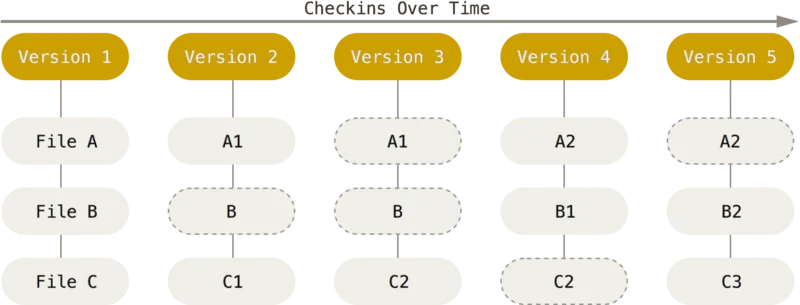
Every change passes through three areas:
- Working directory: the files currently being worked on.
- Staging area (index): a holding area into which exactly the changes destined for the next commit are placed.
- Repository: the complete, versioned history of all commits so far.
Since every local copy of a repository contains the complete project history, commits, branches and comparisons with earlier versions also work offline; a central server is only needed for synchronisation between multiple collaborators, not for the version control itself.
Git vs. other version control systems at a glance
| System | Architecture | Branching | Prevalence today |
|---|---|---|---|
| Git | Distributed (every copy has the full history) | Very fast, practically without delay | The most-used by a wide margin |
| Subversion (SVN) | Centralised (one server) | Considerably more laborious, often as a copy of the directory tree | Occasionally in older enterprise projects |
| Mercurial | Distributed, conceptually similar to Git | Fast, but without Git’s ecosystem of hosting platforms | A niche application |
The major Git hosting platforms
Git itself needs no central server, but in practice collaboration almost always runs via a hosting platform:
| Platform | Type | Particularly suited to |
|---|---|---|
| GitHub | Cloud/SaaS, the largest ecosystem | Open-source projects, broad community connection |
| GitLab | Cloud or self-hosted | Teams with their own CI/CD pipeline in the same system |
| Gitea | Self-hosted, lean | Own infrastructure with full data control |
| Bitbucket | Cloud/SaaS | Teams in the Atlassian ecosystem (Jira, Confluence) |
Branching strategies for teams
How a team organises branches directly influences development speed and code quality. Widespread approaches range from Git Flow (fixed branches for features, releases and hotfixes, well suited to plannable release cycles) through trunk-based development (everyone works with short-lived branches close to the main branch, ideal for frequent deployments) to simple feature branches per task. Which strategy fits depends heavily on the project – in custom software development we therefore set the branching and review structure to match team size and release rhythm, instead of imposing a rigid scheme.
The 2026 trend: AI agents and Git workflows
AI coding agents are increasingly changing how commits come about at all: instead of committing every code change manually, agents today independently generate commit messages, pull request descriptions and in part entire feature branches. To keep that controllable, a clear practice has established itself – agents don’t commit directly to shared branches but work on their own, clearly marked branches whose results are reviewed regularly via pull request before flowing into the main branch. At the same time, the volume of pull requests grows noticeably faster than human reviewers can check manually – code review, rather than pure version management, is thus increasingly becoming the real bottleneck in the development process.
Why version control is indispensable for companies
Git has outgrown its origins as a developer tool for personal filing. Today it’s the foundation of secure, traceable software development in teams:
- Traceability: every change is documented with author, timestamp and rationale – important for debugging, audits and team handovers.
- Safe collaboration: several developers can work on the same code base in parallel without overwriting each other’s changes.
- Low risk of data loss: since Git generally only adds data rather than deleting it, once-committed states can practically always be restored.
- Quality assurance: pull requests and code reviews before merging into the main branch prevent faulty code landing in production unchecked.
For ongoing further development of existing systems, a cleanly kept Git repository is moreover the prerequisite for rolling out new features and bug fixes with low risk at any time, and rolling them back if in doubt.
Practical tips for getting started
- Meaningful commit messages: short, understandable descriptions make it easier for everyone involved (and AI agents) to trace the history later.
- Small, frequent commits instead of rare mammoth commits: eases reviews and makes it simpler to revert individual changes precisely.
- Maintain .gitignore rigorously: prevents build artefacts, credentials or local configuration files accidentally entering the repository.
- Code reviews via pull/merge request: an effective quality brake before changes flow into the main branch, even in small teams.
Conclusion
Git is today the foundation of virtually all professional software development, in a team or solo, with or without AI support in the development process. Which branching strategy, hosting platform and review processes fit your project is something we’re happy to work out as part of our custom software development or directly in a no-obligation consultation.